Shortcut Organization Features
Managing shortcuts for dozens of actions is easy thanks to built-in organization tools:
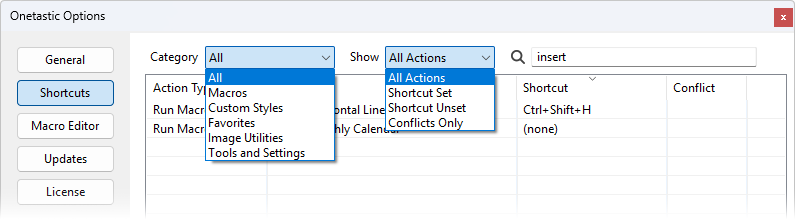
Filtering
- Category filter: View only macros, styles, favorites, image utilities, or tools
- Show filter: See all actions, only those with shortcuts assigned, only those without shortcuts,
or only conflicting shortcuts
- Search: Instantly find any action by typing part of its name
Sorting
Click any column header to sort by:
- Action Type: Group all macros together, all styles together, etc.
- Target: Alphabetically by action name
- Shortcut: See which key combinations you've used
- Conflict: Quickly identify any conflicts that need resolution
The interface remembers your preferences, your selected filters, search terms, column sort order, and even window
position, so everything is exactly how you left it the next time you open the dialog.
Keyboard Shortcuts Topics
If your question isn't answered, send an e-mail to
support@getonetastic.com.